




Dacast has a feature that sends you an email when a video file has finished encoding. This is done to make sure it’s compatible across our system.
This feature can be disabled so you don’t receive email notifications if you don’t want to.
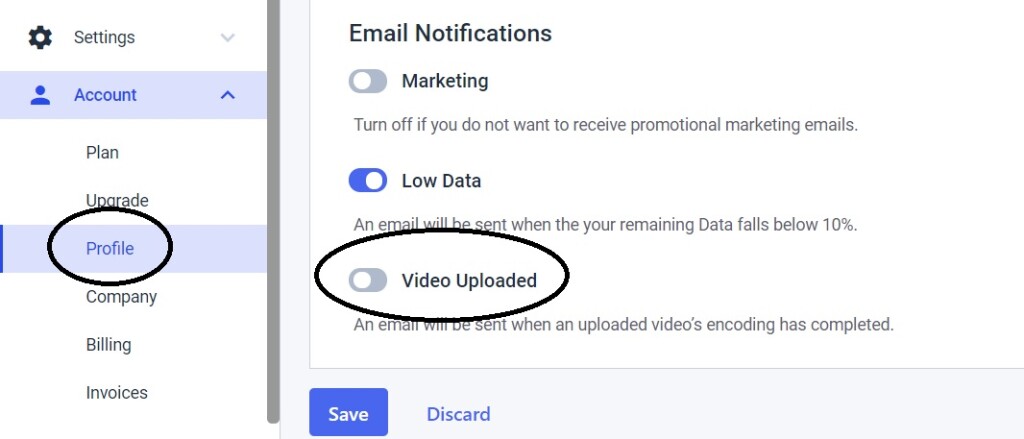
In order to unsubscribe from these emails, log in to your Dacast account, and go to “Account.” Go to “Profile,” and scroll down to the bottom of the page.
You will see “Email Notifications,” and there will be an option called “Video Uploaded.” Turn this from the “ON” position to the “OFF” position to stop receiving them.
Click “Save” to finish:
What is an Encoder?
An encoder is a software or hardware that converts video files from one format or code to another. Video encoding is an essential part to live streaming.
Required Encoder Settings on Dacast
The following encoder settings are required for live streaming with Dacast, regardless of your selected resolution and bitrate:
VIDEO CODEC | H.264 (x264 may work) |
FRAME RATE | 25 or 30 |
KEYFRAME INTERVAL | 3 secs (or 3x frame rate) |
SCANNING | Progressive |
ENCODING BITRATE | Constant (CBR) |
AUDIO CODEC | AAC |
AUDIO BITRATE | 128 kbps |
AUDIO CHANNELS | 2 (Stereo) |
AUDIO SAMPLE RATE | 48 kHz (48,000 Hz) |
Any questions or need help/access to this feature? Please contact us.
Not yet a Dacast user, and interested in trying Dacast risk-free for 14 days? Sign up today to get started.
Additional Resources
- Does Dacast Support Broadcasting via My Own Encoder?
- Walkthrough: Encoder Setup Guide
- Software vs. Hardware Live Streaming Encoders: What’s the Difference?
- Integrating a Live Encoder with the Dacast Platform
- Intro to Live Streaming: A Step by Step Walkthrough
- Video Renditions & Bitrates for On-Demand Content
- New Transcoding Limits on VODs
- Transcoding Walkthrough